8 Best AI Tools for YouTube Creators in 2026
Compare eight AI YouTube tools by what they actually do—from keyword research and scripts to analytics, editing and Shorts.
Jump to comparison ↓Making a YouTube video involves more than recording. You need topics worth covering, engaging scripts, better titles, and a way to keep up with what viewers want.
Many AI tools advertise similar features, but their workflows can be very different. This guide compares eight platforms by what they let you do, how they work, and what they cost—without assuming one tool wins at everything.
Quick answer: Which AI tool fits your channel?
Pick the task you want to improve. The order below is not a performance ranking.
Compare all 8 AI YouTube tools
Features, free access and complete public pricing tiers at a glance.
| Tool | Best for | Main features | Free plan / trial | Plans & pricing |
|---|---|---|---|---|
 vidIQ | Keyword research, video ideas, and AI creator assistance | Keyword researchDaily ideas and outliersAI Coach and scriptsAI Shorts ClippingThumbnails | ✓ Free plan | Free$0Boost$19–$39/moMAX$49–$129/moEnterpriseCustom |
 TubeBuddy | SEO, testing, and channel optimization | Keyword Explorer/SEO StudioThumbnail A/B testingNext Video IdeasThumbnail toolsBulk channel tools | ✓ Free tools | Pro$15/moLegend$32.99/moEnterpriseCustom |
 TrendyTube | Niche research, scripts, keyword monitoring, and Shorts | Scheduled Research HubPersonalized AI scriptsKeyword Search + monitoringAI titles/descriptionsLong videos → Shorts (quality or trending keywords) | ✓ Free plan | Free$0Creator$32/moPro$85/moAgency$498/mo |
 Viewstats | Competitor analytics and outlier discovery | Outlier videosChannel analyticsCompetitor monitoringThumbnail searchCustom alerts | ✓ Free site access | Free siteAccessPro$49.99/moBusinessFrom $249/mo |
 1of10 | Outlier video ideas and packaging | Outlier Finder + Niche ExplorerShorts OutliersAI video ideas and titlesAI thumbnail toolsCompetitor tracking | ✓ Free plan | Free$0Basic$19/moPro$89/moUltra$4,999/yr |
 OutlierKit | Deep competitor, audience, and niche research | Outlier and keyword researchCompetitor StudioAudience intelligenceDeep ResearchScript and hook analysis | ✓ 30-credit trial | Hobby$49/moPro$99/moMax$399/mo |
 Subscribr | AI scripts, thumbnails, and finished videos | Outlier-based ideasChannel-aware Script AgentResearch AssistantAI thumbnailsFinished video generation | ✓ Free plan | Free$0Growth$99/moPro$249/moMax$499/mo |
 OpusClip | AI Shorts and video repurposing | AI clipping + Virality ScoresAuto captions and reframingVideo editorAI/stock B-rollSocial publishing | ✓ Free plan | Free$0Starter$15/moPro$29/moBusinessCustom |
Prices in USD, verified November 6, 2026 against current official pricing pages. Monthly prices refer to monthly billing unless stated; annual billing and effective monthly rates are called out in the detailed sections. Taxes, regional pricing, promotions, and checkout totals can vary.
Editor's note: TrendyTube is included in this comparison, which is published by the TrendyTube team.
How we compared these tools: We reviewed features, typical workflows, free access, and pricing. TrendyTube was assessed using working application screenshots and product details provided by its owner; the other seven tools were researched using official websites and documentation. This is a feature-based comparison, not identical hands-on performance testing.
vidIQ — Best for YouTube Research and AI Creator Assistance
Best for: Keyword research, video ideas, and AI creator assistance. vidIQ combines YouTube research, channel insights, and AI creation tools. It helps creators decide what to film, understand search demand, and get assistance with content production.
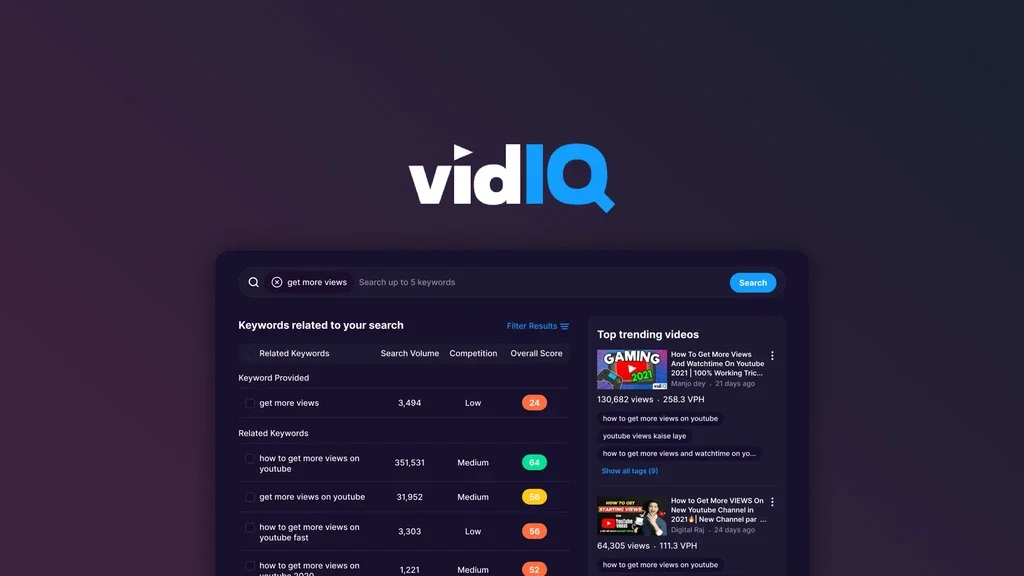
What can you do with vidIQ?
Research Keywords and Trending Topics
Compare estimated YouTube search volume, competition, keyword scores, and related searches before recording.
Discover Ideas and Analyze Competitors
Explore personalized daily ideas and outlier videos—uploads that perform unusually well relative to their channel averages.
Generate Scripts, Titles, and Thumbnails
Use AI writing and design tools for scripts, metadata, and thumbnails. AI Coach provides channel-oriented guidance.
Turn Long Videos Into Shorts
AI Shorts Clipping finds candidate moments, reframes them for vertical viewing, and adds captions; supported editing controls let creators adjust clips.
Channel audits · Best posting times · Browser extension · Subscriber insights · Video optimization guidance
✓ Pros
- Broad mix of research and AI creation tools
- Keyword and competitor insights for planning
- AI clipping available alongside other creator tools
− Cons
- Higher-use AI tools have quotas and plan limits
- Keyword scores and AI recommendations cannot guarantee views
vidIQ plans & pricing
Official pricing ↗| Plan | Price | What's included |
|---|---|---|
| Free | $0 | 150 AI credits/month |
| Boost | $19–$39/mo | 2,000 credits $19; 2,500 credits $29; 3,000 credits $39 |
| MAX | $49–$129/mo | 6,000 credits $49; 8,000 credits $89; 10,000 credits $129 |
| Enterprise | Custom | Teams, multiple channels, roles, reporting and support |
US list prices. Annual billing is also offered: the current base tiers show Boost with 2,000 credits at $199/year ($16.58/month effective) and MAX with 6,000 credits at $468/year ($39/month effective). Local pricing may vary.
Choose vidIQ if you want keyword research, ideas, AI content assistance, and channel guidance in a single toolkit.
TubeBuddy — Best for YouTube SEO and Channel Optimization
Best for: SEO, testing, and channel optimization. TubeBuddy specializes in YouTube optimization and channel management. It is useful for improving existing uploads, testing packaging, and reducing repetitive maintenance.
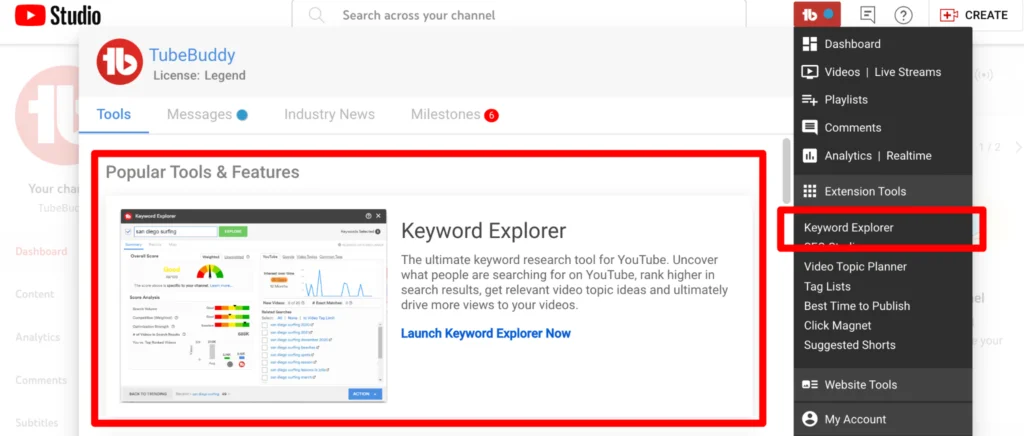
What can you do with TubeBuddy?
Research Keywords and Improve Video SEO
Keyword Explorer estimates search demand and competition, while SEO Studio guides title, description, tag, and other metadata decisions.
A/B Test Video Packaging
Eligible accounts can compare alternative thumbnails, titles, or descriptions using performance data rather than guesswork.
Find Content Opportunities
Next Video Ideas uses channel and audience signals to suggest topics; additional niche tools help explore related opportunities.
Create Thumbnails and Manage Videos
Thumbnail-generation and analysis tools support visual packaging, while bulk tools streamline repeated actions across an existing video library.
Suggested Shorts · Title Generator · Click Magnet · Search rank tracking · Channel analytics · End-screen tools
✓ Pros
- Useful metadata optimization and testing tools
- Strong support for established video libraries
- Ideas and thumbnail tools complement its SEO features
− Cons
- Advanced testing and bulk operations are plan-dependent
- Not a complete script-to-video production suite
TubeBuddy plans & pricing
Official pricing ↗| Plan | Price | What's included |
|---|---|---|
| Free tools | $0 | Limited free tools and extension access |
| Pro | $15/mo | Core video, thumbnail and optimization tools |
| Legend | $32.99/mo | Advanced analytics, SEO, A/B testing and bulk tools |
| Enterprise | Custom | Multi-channel organizations, training and dedicated support |
Annual billing: Pro is $144/year ($12/month effective); Legend is $316.68/year ($26.39/month effective). TubeBuddy labels creator-plan prices as approximate and charges in USD.
Choose TubeBuddy if metadata optimization, thumbnail testing, and maintaining an existing channel are your priorities.
TrendyTube — Best for AI Video Research, Personalized Scripts, and Shorts
Best for: Niche research, scripts, keyword monitoring, and Shorts. TrendyTube brings niche research, video ideas, channel-informed scripts, keyword analysis, metadata generation, and Shorts editing into one workspace. Research and keyword monitoring can refresh on user-selected schedules.
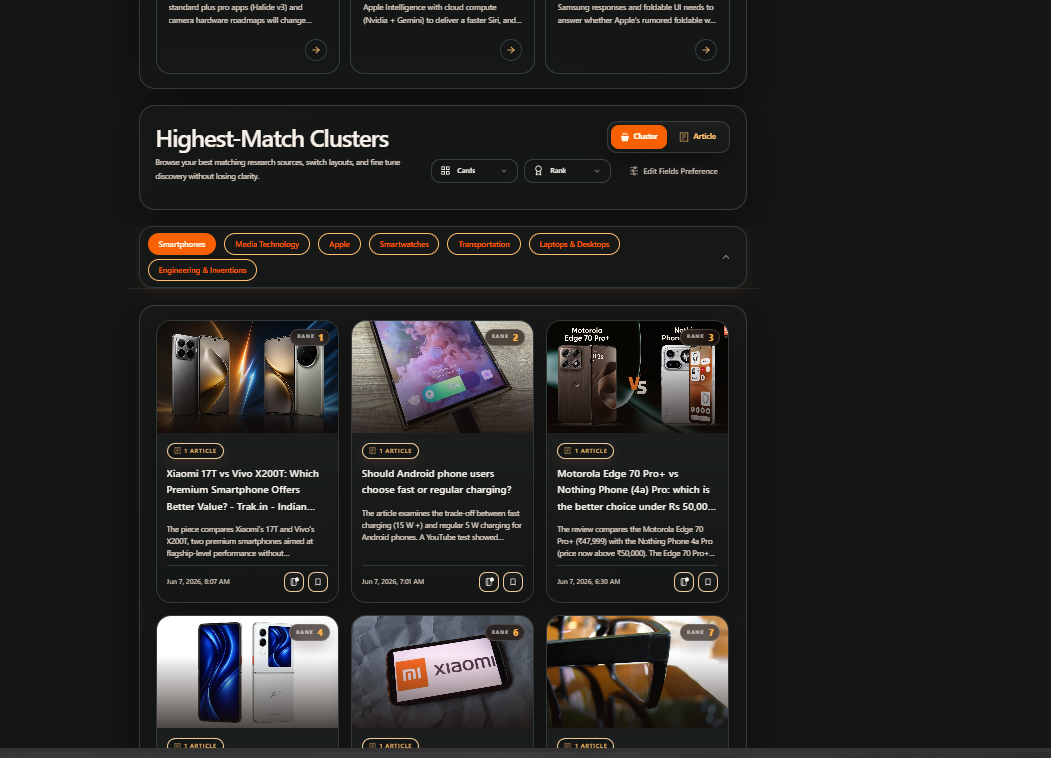
What can you do with TrendyTube?
Discover Relevant News on a Schedule
Research Hub examines a reference channel’s niche and discovers relevant articles. It groups related stories, ranks topic clusters, and develops ideas with outlines and source links. Supported refresh options are hourly, daily, weekly, or manual.
Write Scripts Informed by Channel Style
Using available past transcripts, TrendyTube analyzes tone, phrasing, pacing, and storytelling structure. It combines selected articles or ideas with that context to draft scripts with adjustable language and length.
Keyword Search + Scheduled Video Monitoring
Keyword Search explores search demand by country. Separately, Video Keywords Automation tracks selected uploads, highlights momentum changes, and notifies creators when relevant terms present an opportunity.
Create Titles and Descriptions with SEO Context
Generate alternatives using video content, keyword trends, or creator-defined writing preferences. Users can adjust tone, structure, and keyword selection and compare suggestions with supporting momentum information.
Turn Long Videos into Shorts — by Quality or Trends
TrendyTube analyzes long-form videos to surface moments suitable for Shorts. Choose a content-focused approach to prioritize engaging clips based on the video’s content and quality, or a trend-focused approach that considers relevant trending SEO keywords discussed in the video. Then select Standard or Premium generation, set the clip window, review suggested clips with scores and transcripts, and refine them using captions, effects, and timeline editing before export.
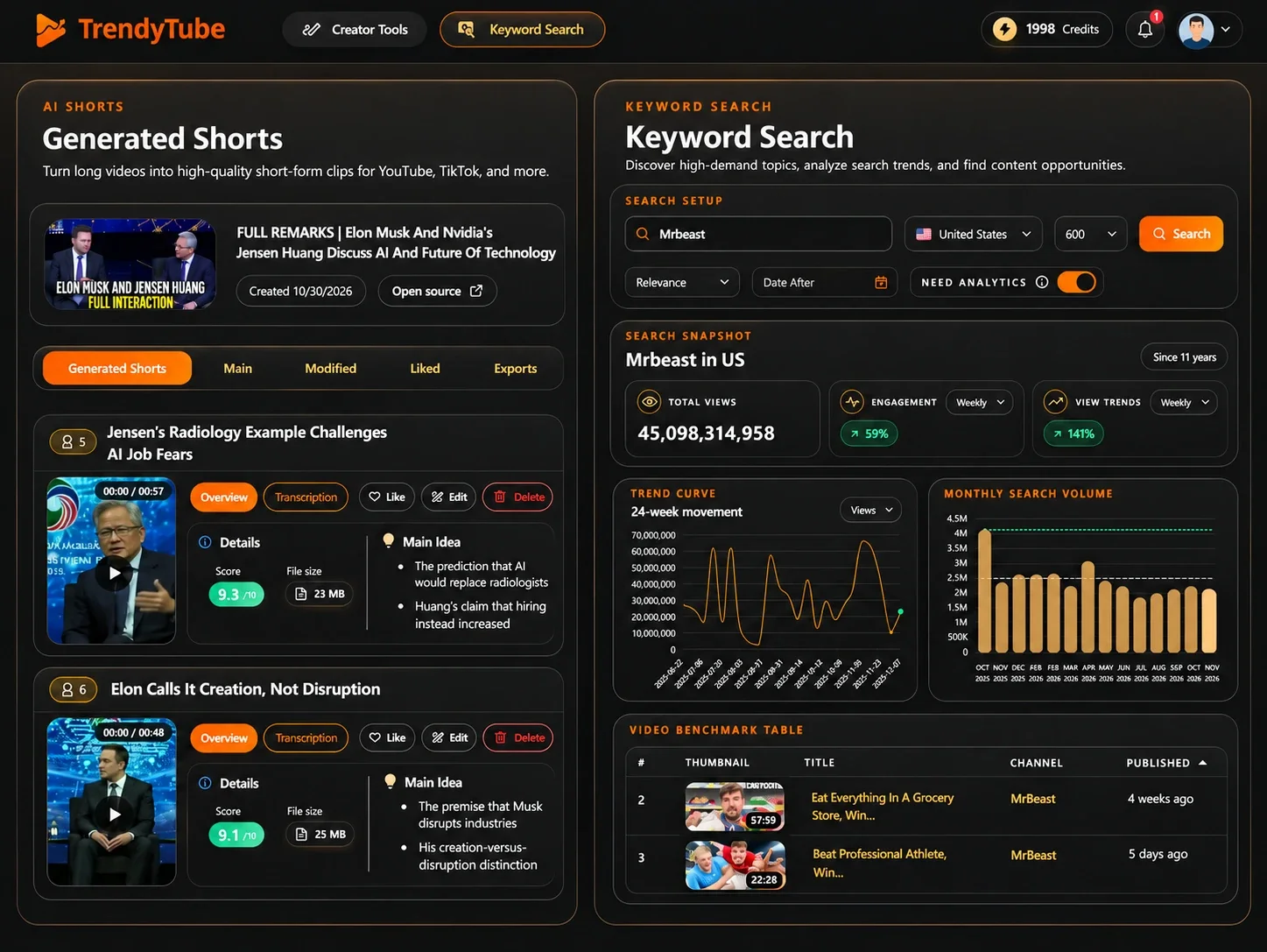
Ranked article clusters · Source-linked ideas · Keyword momentum charts · Metadata coverage maps · Clip scoring · Caption presets
✓ Pros
- Combines research, scripts, metadata and short-form production
- Separate schedulers for niche research and existing-video keyword monitoring
- Offers trend-informed choices and user-defined writing preferences
- Lets creators decide whether and when to generate changes
− Cons
- Generation and automation usage depend on credits and plan limits
- AI research and scripts still need human fact-checking
- Not a full long-form editor; it does not auto-publish metadata changes
TrendyTube plans & pricing
Official pricing ↗| Plan | Price | What's included |
|---|---|---|
| Free | $0 | 35 credits/month; 1 research channel; 2 scripts; 3 Shorts generations |
| Creator | $32/mo | 120 credits; 10 scripts; 50 tracked videos; 20 Shorts generations |
| Pro | $85/mo | 325 credits; 40 scripts; 300 tracked videos; 50 Shorts generations |
| Agency | $498/mo | 2,000 credits; 200 scripts; 500 tracked videos; 200 Shorts generations |
Monthly plans only. Free exports are up to 720p and paid plans up to 1080p; research frequency, keyword, storage and video limits vary. No annual plan is currently offered.
Choose TrendyTube if you want researched ideas, channel-informed scripts, metadata and keyword opportunities, and Shorts generation within one creator workflow.
Free plan available · No credit card required
Viewstats — Best for YouTube Competitor Analytics
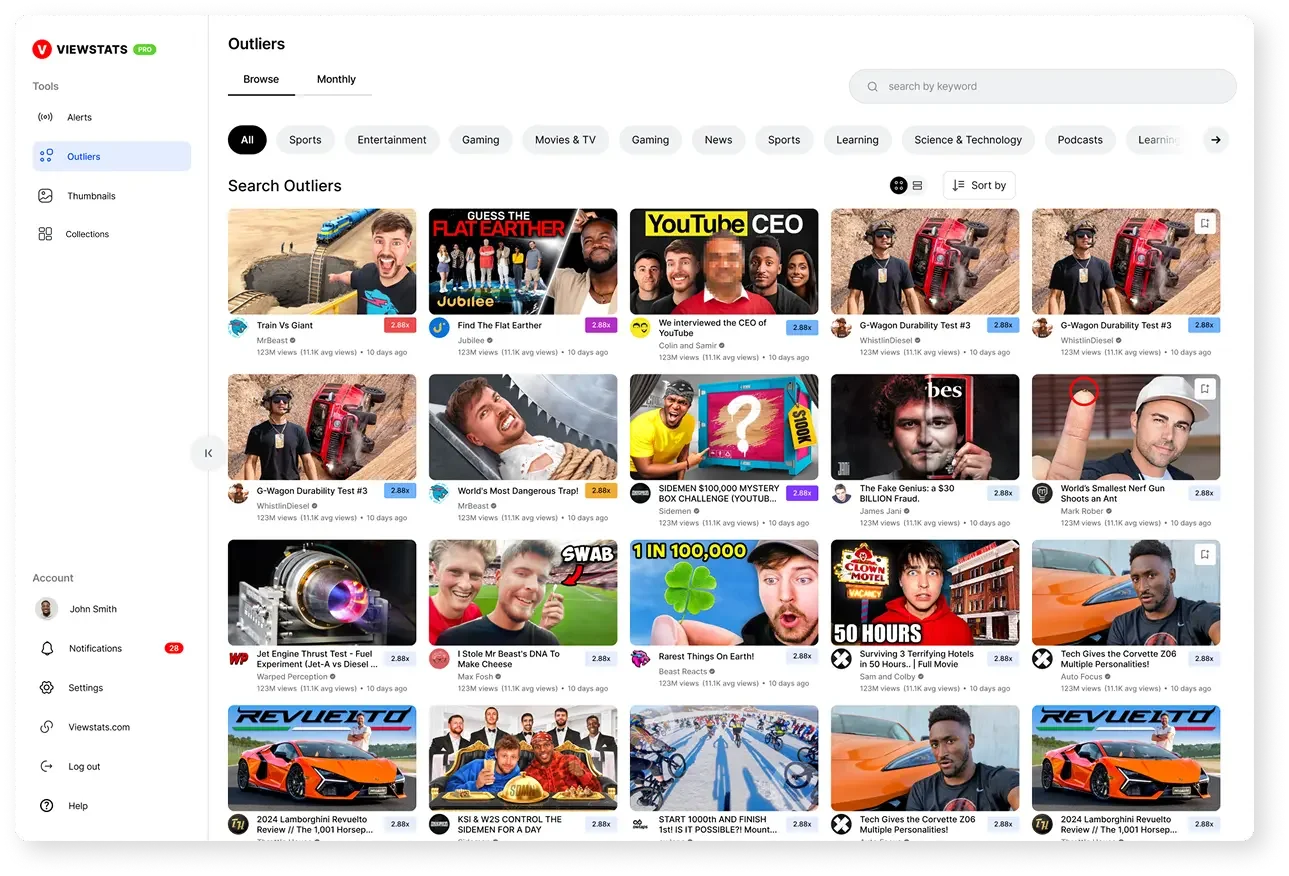
Best for: Competitor analytics and outlier discovery. Viewstats focuses on video performance, competitor research, and thumbnail inspiration. It helps creators study which content formats outperform expectations.
What can you do with Viewstats?
Find Outlier Videos
Discover uploads that perform well beyond their channel’s usual results, then investigate the subjects and formats behind them.
Study Channels and Competitors
Explore video performance, channel growth patterns, and content trends across competing creators.
Research Thumbnail Approaches
Thumbnail Search helps users study existing visual styles and packaging patterns from successful videos.
Track Research With Alerts and Collections
Follow selected activity and organize promising thumbnails and videos in research collections for later review.
Long-form and Shorts outliers · Performance charts · Creator dashboards · Research organization
✓ Pros
- Strong performance-based content research
- Useful competitor and thumbnail discovery
- Collections and alerts make research easier to revisit
− Cons
- Not a full scriptwriting or editing suite
- Advanced research features require paid access
Viewstats plans & pricing
Official pricing ↗| Plan | Price | What's included |
|---|---|---|
| Free site | Free access | Limited public analytics and research access |
| Pro | $49.99/mo | Competitors, Outliers, Alerts, Collections and Thumbnail Search |
| Business | From $249/mo | Unlimited credits, volume licensing, advanced analytics and Business API |
Viewstats offers a free site alongside paid plans. Pro is currently $49.99/month; Business starts at $249/month. Temporary promotions can change the checkout price without changing the list price.
Choose Viewstats if competitor performance and successful video formats are central to your content planning.
1of10 — Best for Breakout Video Ideas and Thumbnails
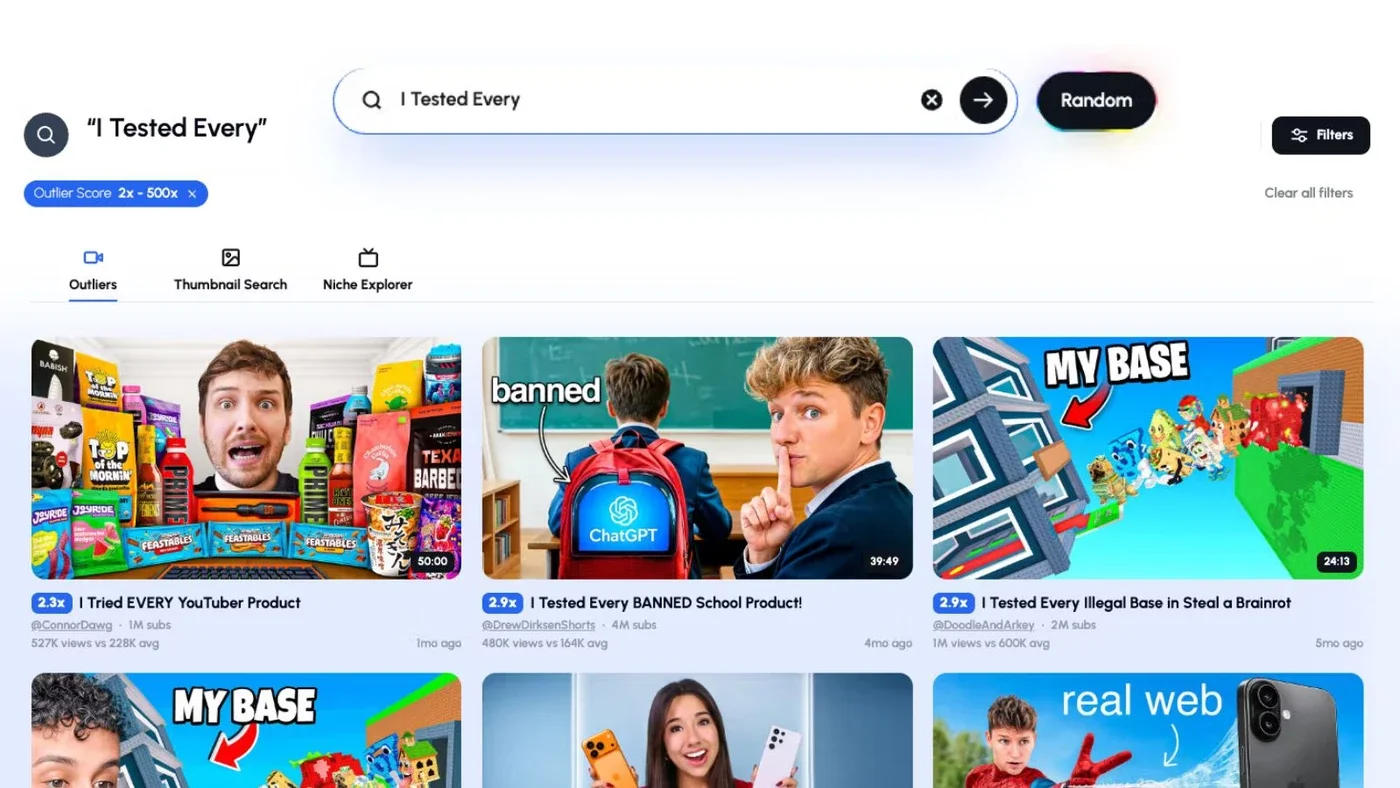
Best for: Outlier video ideas and packaging. 1of10 helps creators discover videos that exceed a channel’s typical performance and turn that research into original concepts, titles, and thumbnails.
What can you do with 1of10?
Explore Outliers and Niches
Search topics and channels for videos outperforming their usual baseline; refine results with category, date, views, and other filters.
Research Short-form Outliers
Find Shorts that stand out, rather than assuming successful long-form strategies transfer directly to Shorts.
Generate Titles, Ideas, and Thumbnails
Use outlier patterns as inspiration for original content ideas, title variants, and AI thumbnail concepts.
Follow Competitors and Packaging Patterns
Track relevant channels and inspect similar titles or thumbnail treatments to spot recurring approaches.
Saved research · Trending formats · Similar-title and thumbnail search · AI Video Editor (availability varies by account/plan)
✓ Pros
- Outlier research connects to creative development
- Dedicated Shorts outlier discovery
- Useful title and thumbnail research features
− Cons
- Outlier examples are signals, not guarantees
- AI features use shared credits and tier limits
1of10 plans & pricing
Official pricing ↗| Plan | Price | What's included |
|---|---|---|
| Free | $0 | 60 credits/month; limited research results; 1 connected channel |
| Basic | $19/mo | 150 credits/month; up to 3 channels; all research and AI tools |
| Pro | $89/mo | 1,000 credits/month; unlimited channels; team seats, MCP and API access |
| Ultra | $4,999/yr | 3,500 credits/month; coaching, private community, MCP and API access |
Annual billing: Basic is $180/year ($15/month effective) and Pro is $828/year ($69/month effective). Ultra is annual-only at $4,999/year (about $417/month).
Choose 1of10 if researching breakout ideas and turning them into better titles and thumbnails is your priority.
OutlierKit — Best for Deep Competitor and Niche Research
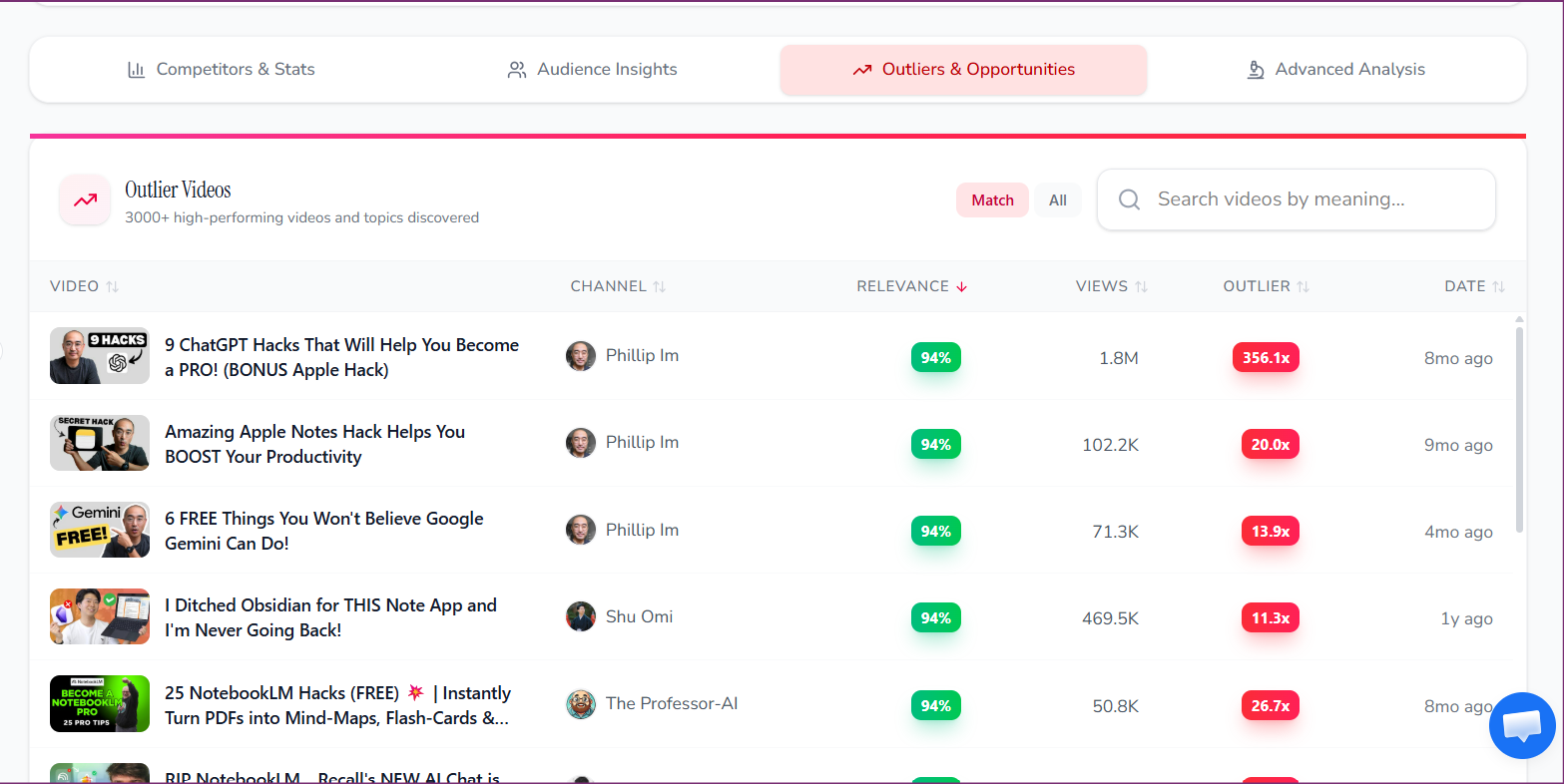
Best for: Deep competitor, audience, and niche research. OutlierKit focuses on channel intelligence, niche research, keyword opportunities, and audience analysis. It suits creators and teams who want to validate ideas before production.
What can you do with OutlierKit?
Research Outliers and Keywords
Study unusual video performance and keyword opportunities to assess topics before committing to production.
Map Competitors With Competitor Studio
Research related channels across a niche, including positioning, benchmarks, emerging competitors, and high-performing content.
Understand Audiences and Monetization
Explore audience interests, comment patterns, sponsor relationships, and business signals beyond views.
Analyze Hooks and Script Structure
Review video concepts, scripts, and hooks for potential improvements; Deep Research supports more detailed strategy questions.
Single-channel audits · Titles, descriptions, tags and chapters · Video analysis · API/MCP integrations (selected plans)
✓ Pros
- Detailed competitor and niche intelligence
- Audience and commercial signals extend beyond view counts
- Useful for research-first content strategies
− Cons
- Not an integrated finished-video production platform
- Higher-tier features and frequent research require credits
OutlierKit plans & pricing
Official pricing ↗| Plan | Price | What's included |
|---|---|---|
| Free trial | $0 | 30 credits; no credit card required |
| Hobby | $49/mo | 100 credits/month; core keyword, outlier and channel research |
| Pro | $99/mo | 500 credits/month; Competitor Studio, MCP and API access |
| Max | $399/mo | 2,000 credits/month; 50+ channels, sponsor/comment intelligence and on-demand updates |
Annual billing: Hobby is $299/year ($24.92/month effective), Pro is $599/year ($49.92/month effective), and Max is $1,999/year ($166.58/month effective). Quarterly and lifetime billing options are also offered.
Choose OutlierKit if you need deeper competitor and audience intelligence, including niche-wide research and content analysis.
Subscribr — Best for AI Scriptwriting and Video Production
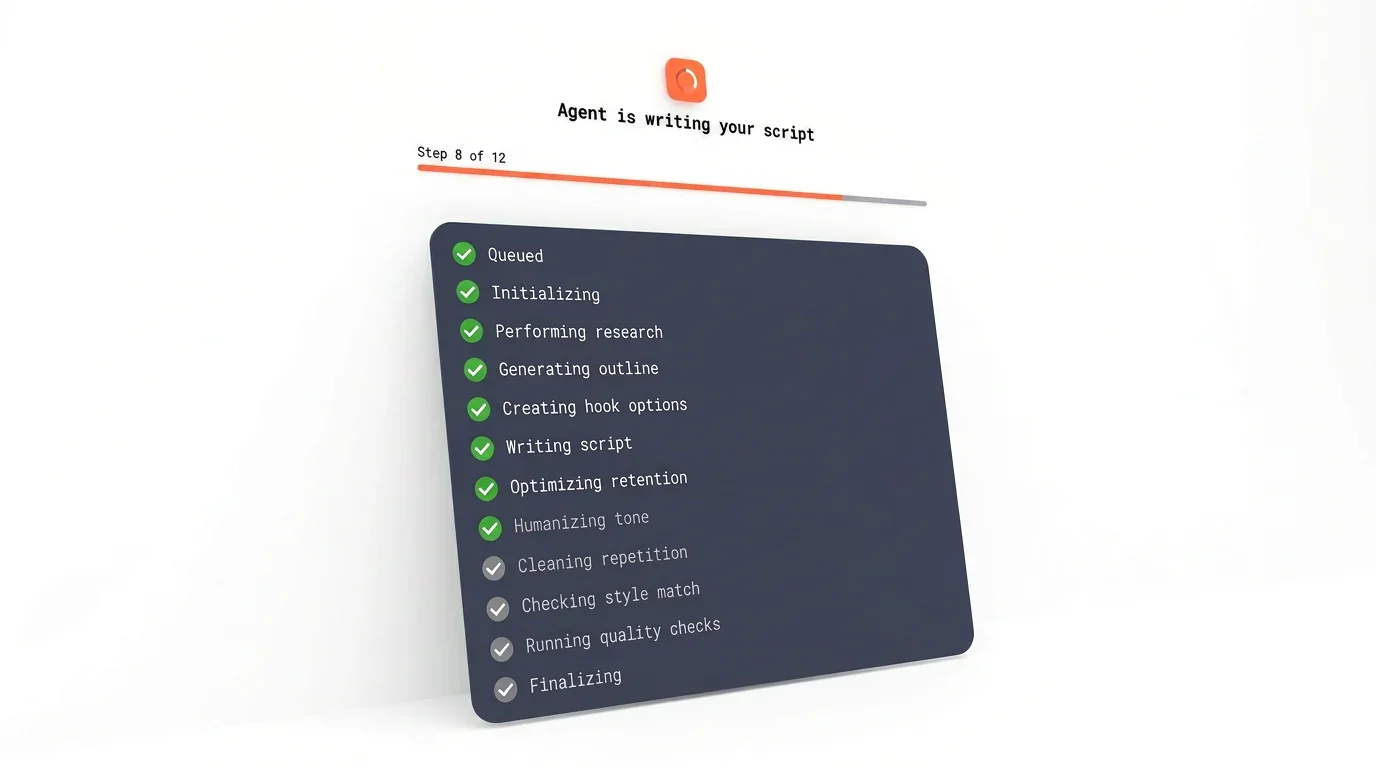
Best for: AI scripts, thumbnails, and finished videos. Subscribr connects video research, script development, thumbnail creation, and AI-assisted production, including workflows for faceless and AI-presenter content.
What can you do with Subscribr?
Research Ideas and Competitors
Study existing YouTube videos and outlier patterns; Research Assistant can use videos, articles, and documents to support planning.
Develop Scripts in Your Channel Voice
Script Agent uses research, hooks, and narrative structure alongside available channel context to produce editable drafts.
Generate Thumbnails
AI Thumbnail Studio supports thumbnail concepts and adjustments with styles and references.
Create Finished Videos
Produce projects from scripts using uploaded recordings, AI avatars, or faceless workflows, with supporting visuals, captions, B-roll, and voice options.
Project management · Script editing · Channel voice profiles · Agent integrations · API access and team workflows
✓ Pros
- Research, scripts, thumbnails and video production connect
- Useful for faceless and avatar production
- Structured writing pipeline with channel context
− Cons
- Free access does not include full paid script/video generation
- Script and finished-video usage allowances need monitoring
Subscribr plans & pricing
Official pricing ↗| Plan | Price | What's included |
|---|---|---|
| Free | $0 | 1 channel/user; 3 idea batches and 10 intel searches per month |
| Growth | $99/mo | 60 script credits; 150 thumbnails; 66 video minutes; 3 channels/users |
| Pro | $249/mo | 180 script credits; 500 thumbnails; 185 video minutes; 5 channels, 10 users |
| Max | $499/mo | 300 script credits; 1,000 thumbnails; 415 video minutes; unlimited channels/users |
Annual billing is available for two months less than paying monthly for a full year. Finished-video rates on monthly billing are $1.50/minute on Growth, $1.35 on Pro and $1.20 on Max; annual billing lowers them to $1.25, $1.12 and $1.00 respectively.
Choose Subscribr if you want to carry content from research and scripts through to thumbnails and finished AI-assisted videos.
OpusClip — Best for AI Shorts and Video Repurposing
Best for: AI Shorts and video repurposing. OpusClip specializes in finding, editing, and distributing clips from longer recordings. It is particularly useful for podcasts, interviews, and talking-head content.
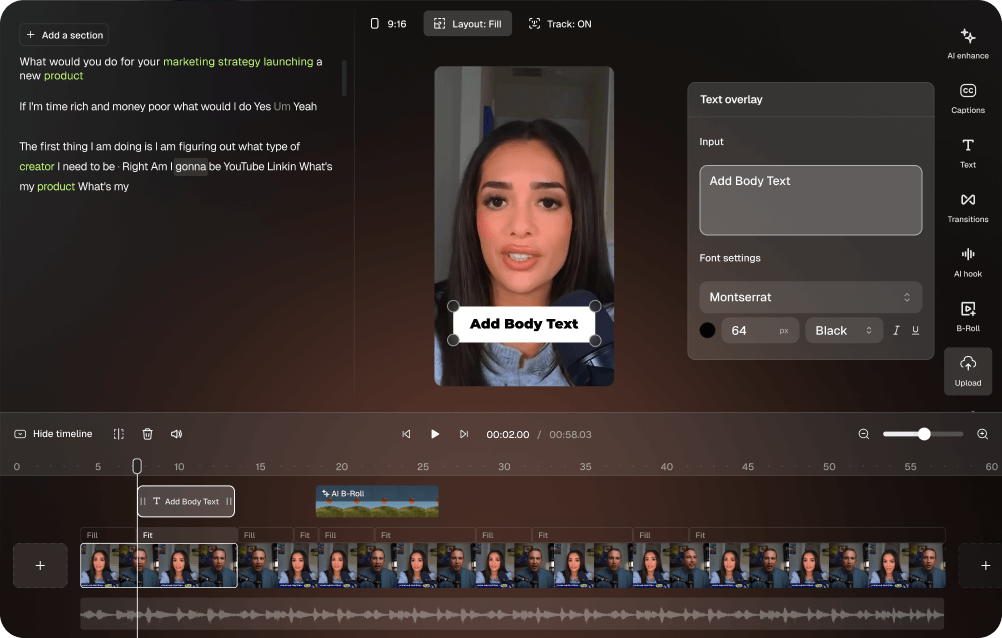
What can you do with OpusClip?
Find Candidate Clips Automatically
Analyze long videos to surface potential short-form segments, with internal Virality Scores to help compare suggestions.
Add Captions and Reframe for Vertical Screens
Generate captions and adapt framing, including speaker tracking in supported workflows.
Edit Clips With AI Assistance
Trim clips, change caption styles, adjust layouts, add B-roll, and use audio or branding tools according to plan.
Export, Schedule, and Publish
Manage and distribute finished clips to supported platforms, with higher-tier options for teams and multiple accounts.
Multiple aspect ratios · Brand templates · Filler removal · Audio cleanup · Premiere Pro/DaVinci exports (selected plans)
✓ Pros
- Deep specialization in short-form repurposing
- Captioning, vertical reframing and editing controls
- Publishing and collaboration on supported plans
− Cons
- Not centered on keyword research or long-form scripting
- Free outputs have watermark and editing restrictions
OpusClip plans & pricing
Official pricing ↗| Plan | Price | What's included |
|---|---|---|
| Free | $0 | 60 credits/month; limited exports and editing |
| Starter | $15/mo | 150 credits/month; editing, captions, posting and watermark removal |
| Pro | $29/mo | 300 credits/month; advanced editing, rollover credits, team workspace and social connections |
| Business | Custom | Enterprise queue, tailored limits, integrations and support |
Pro annual billing is currently $174/year ($14.50/month effective). Starter is listed at $15/month; Business pricing is custom.
Choose OpusClip if transforming existing videos into edited, shareable short clips is the main job you need to solve.
What's different between these tools?
Several products offer the same category of feature. Here is how their approaches differ.
How they find video ideas
| Tool | Research approach |
|---|---|
| vidIQ | Keywords, channel signals, competitors and AI ideas |
| TubeBuddy | Search optimization, niche research and channel-informed suggestions |
| TrendyTube | Scheduled niche article discovery, ranked story clusters, and channel-informed ideas |
| Viewstats | Competitor performance and unusually successful uploads |
| 1of10 | Outliers, niche exploration, titles and thumbnail patterns |
| OutlierKit | Deeper competitor, keyword, audience and niche analysis |
| Subscribr | Outlier research combined with script and video production |
| OpusClip | Finds short-form moments within existing footage rather than new video topics |
Where their production tools differ
Shorts: vidIQ offers AI clipping, TrendyTube connects clipping with keyword-informed options and an editor, while OpusClip specializes in advanced repurposing and publishing.
Scripts: TrendyTube uses selected research and channel style; Subscribr connects its structured Script Agent with thumbnails and finished-video workflows; vidIQ also offers AI writing.
Optimization: TubeBuddy emphasizes SEO guidance and testing; vidIQ emphasizes research and AI guidance; TrendyTube also monitors keyword opportunities on existing videos.
Competitor research: Viewstats and 1of10 emphasize performance/outliers, while OutlierKit adds deeper niche, audience and commercial intelligence.
Do you need several tools? Not necessarily. Start with the task taking the most time. A dedicated clipping tool may be enough for Shorts-first channels, while teams working across research, scripts and production may value a broader workflow.
Frequently asked questions
What is the best AI tool for YouTube beginners?
vidIQ and TubeBuddy have free ways to try research and optimization. TrendyTube also offers a free plan with selected research, scriptwriting and Shorts capabilities. Choose based on your first real need.
Can AI tools help find trending YouTube topics?
Yes. vidIQ, TrendyTube, 1of10 and OutlierKit draw on different signals, including keyword demand, article research, channel information and outlier videos. A trend should still be relevant to your audience.
Which AI tools can turn long videos into Shorts?
vidIQ, TrendyTube and OpusClip all offer AI-assisted clipping. Their approaches differ in clip controls, keyword inputs, editing depth and distribution options; compare plan allowances before buying.
Can AI write YouTube scripts in my own style?
Some products, including TrendyTube and Subscribr, use channel history to guide tone and structure. Review all generated scripts for accurate facts, natural phrasing and creator identity.
What is the difference between keyword research and keyword monitoring?
Keyword research investigates a phrase or topic. Keyword monitoring follows selected terms over time. TrendyTube offers both standalone Keyword Search and scheduled Video Keywords monitoring for existing uploads.
Which AI tools can help with YouTube thumbnails?
TubeBuddy, vidIQ, 1of10 and Subscribr offer different thumbnail tools. Some generate ideas or designs; others analyze examples or support testing.
Are there free AI tools for YouTube creators?
Yes. vidIQ, TubeBuddy, TrendyTube, 1of10, OpusClip and Subscribr offer forms of free access; OutlierKit offers a limited trial. Free quotas and eligible capabilities vary.
Do AI keyword tools or Virality Scores guarantee more views?
No. Keyword estimates, outlier scores and AI suggestions can inform creative decisions, but cannot guarantee views, rankings or recommendations.
Final thoughts: Choose for your workflow
The best AI tool for YouTube is the one that solves your real problem. For keywords and channel guidance, consider vidIQ or TubeBuddy. For outliers and competitor strategy, explore Viewstats, 1of10 or OutlierKit.
If you need AI scripts and completed video production, see Subscribr. For deep short-form repurposing, OpusClip is a specialist. For niche article research, channel-informed scripts, keyword monitoring, metadata and Shorts in one creator workspace, consider TrendyTube.
Start with the problem you need to solve—not the longest feature list.
Explore TrendyTube's free plan
Research new topics, draft scripts, monitor keyword opportunities and create Shorts in a creator-controlled workflow.