YouTube Video Ideas: How to Find Fresh Topics for Your Niche
A simple way to think about what to make next—and how to keep finding ideas that fit your channel.

Finding Your Next YouTube Video Idea Takes More Work Than You Think
Finding a good YouTube video idea isn't always easy.
You have to see what's happening in your niche, read articles, check what other creators are talking about, and figure out which topics your viewers might actually care about.
And finding an interesting story is only half the work. You still have to understand it, check the details, and come up with your own angle.
Before you know it, you've got a bunch of tabs open and you're still not sure what to make next.
But here's something pretty cool about newer AI agents: they're not just there to answer questions anymore. You can set some of them up to do specific jobs for you.
And research is one of those jobs.
Think about it. You could have a research helper set up around your YouTube channel. It could regularly look for relevant stories, bring together related articles, and suggest video ideas based on the topics you cover.
Of course, that doesn't mean every idea will be great. You still need to check the information and decide what's worth making.
But having a few researched ideas ready to look through? That's a lot nicer than starting from zero every time.
The Same News Can Become a Completely Different Video
Finding trending topics for YouTube can be a good starting point. But just because something is in the news doesn't mean your viewers will want to watch a video about it.
Let's say you have a tech channel.
In November 2026, Google announced new Gemini Intelligence features for Pixel phones, including the Pixel 10 lineup.
You could make a video simply listing everything Google announced. But what if you took a different angle?
“Are Google's new Pixel AI features actually useful in everyday life?”
Now you've got a question to explore: what the features actually do, which phones support them, and whether they solve problems people really have.

The same goes for YouTube content ideas in other niches.
For a world-news creator, the recent Ukraine–Russia talks might lead to: “What actually changed after the latest peace talks?”
For a health-tech creator, Oura's plan to acquire Counsel Health could raise a different question: “Are smart rings becoming more than fitness trackers?”
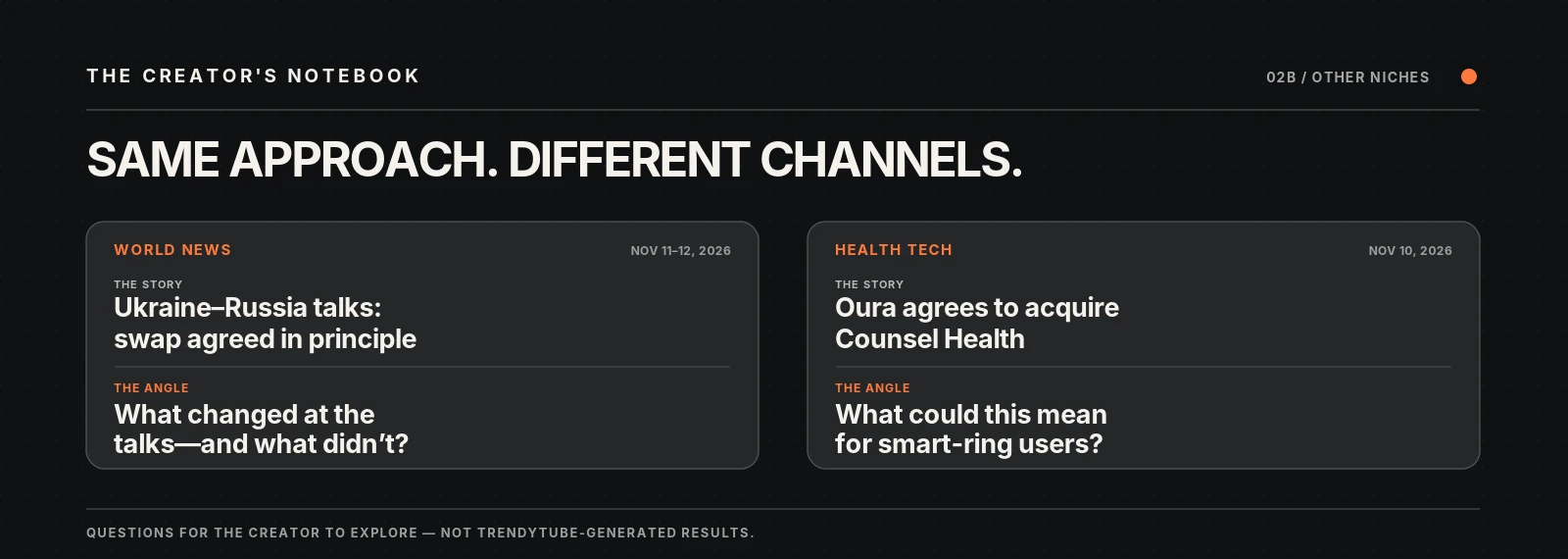
See the difference? The news gives you something to talk about. But the angle gives your viewers a reason to watch.
Whenever you're deciding whether a story is worth covering, it helps to ask:
Sometimes those three questions are enough to turn a headline into the beginning of a video. The harder part is doing it again for your next upload—and the one after that.
So, How Do You Keep Finding Ideas Like These?
Coming up with one good idea is nice. But what about next week? Or the week after that?
You probably don't want to spend hours checking news websites and reading articles every time you need something new to talk about.
This is where a YouTube research tool—or an AI agent set up around your channel—can be useful.
The idea is pretty simple. You give an agent some context about the kind of content you're interested in, and it does some of the research for you.
For example, TrendyTube's Research Hub can use a reference YouTube channel to understand the kinds of topics it covers, based on available video titles and transcripts.
It then looks for relevant articles, groups coverage of the same story together, and ranks those topics by how relevant they are to the channel.
From there, it can suggest video ideas with possible angles, outlines and links to the research behind them. So you're not just getting a random list of titles. You can see the information behind an idea and decide whether it's worth exploring.
That matters more than getting a dozen titles from a YouTube video idea generator. You have something to check and build on.

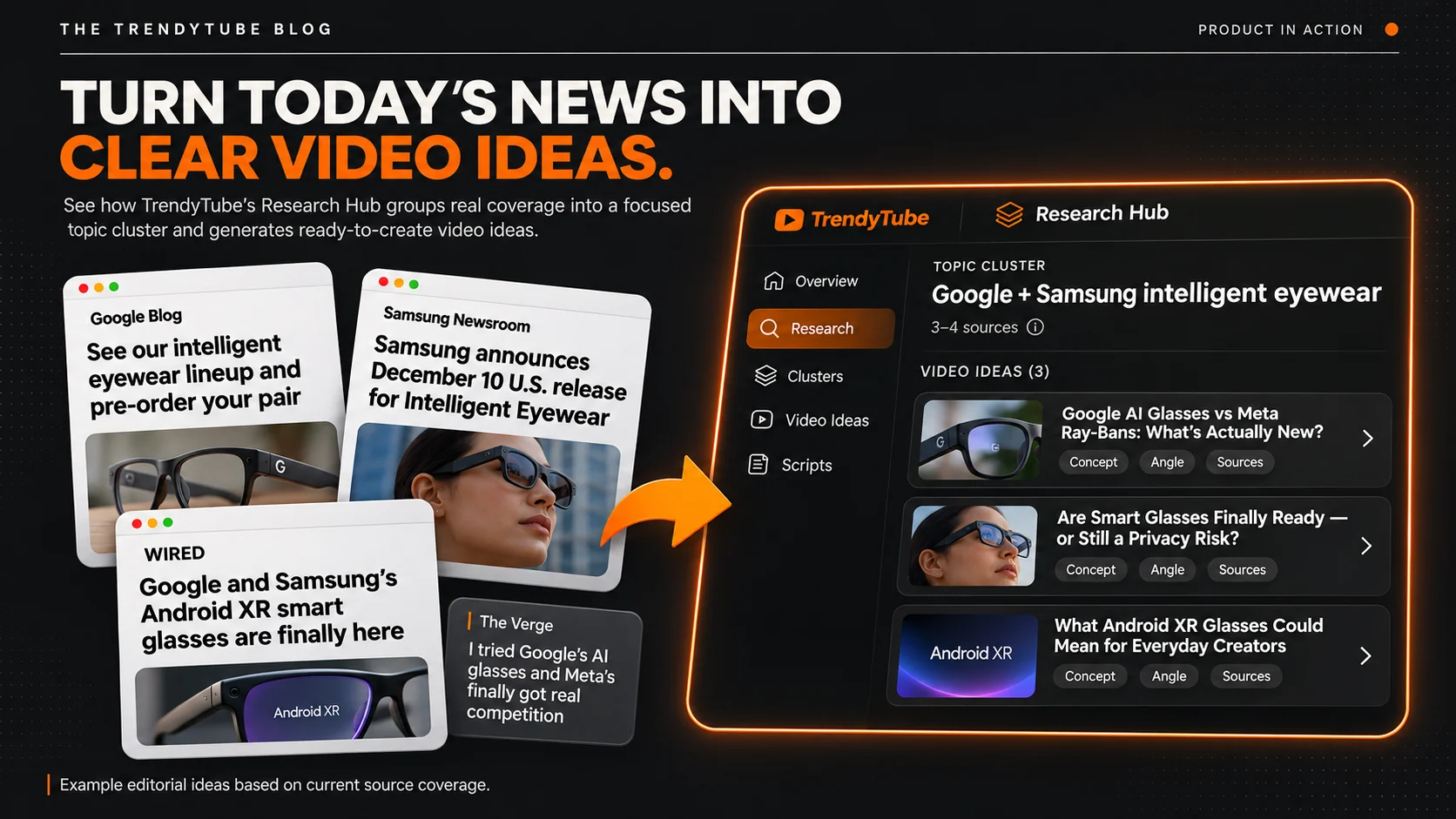
And here's another useful part: you can schedule the research around your own routine.
Maybe you plan your videos once a week. Or maybe your channel covers fast-moving news and you want more frequent updates.
Research Hub supports weekly, daily or hourly scheduling depending on your plan. You can choose the run timing and timezone. So while you're filming, editing or doing something else, the research can run on the schedule you've set.
Of course, you still need to review the suggestions. A topic being relevant to your channel doesn't automatically make it a great video.
Let's Look at a Real Example
Okay, so what does this actually look like?
In one of our recorded TrendyTube Research Hub sessions, an idea for a technology channel focused on the AI health features in Fitbit, Apple Watch and Samsung wearables.
The question wasn't simply which smartwatch was best. It was more specific: Which AI health features might actually help athletes?
That's an interesting direction because it gives a creator something to investigate, compare and explain.
And the idea wasn't just a title sitting on its own. The workspace also connected it to supporting research that could be checked before making the video.
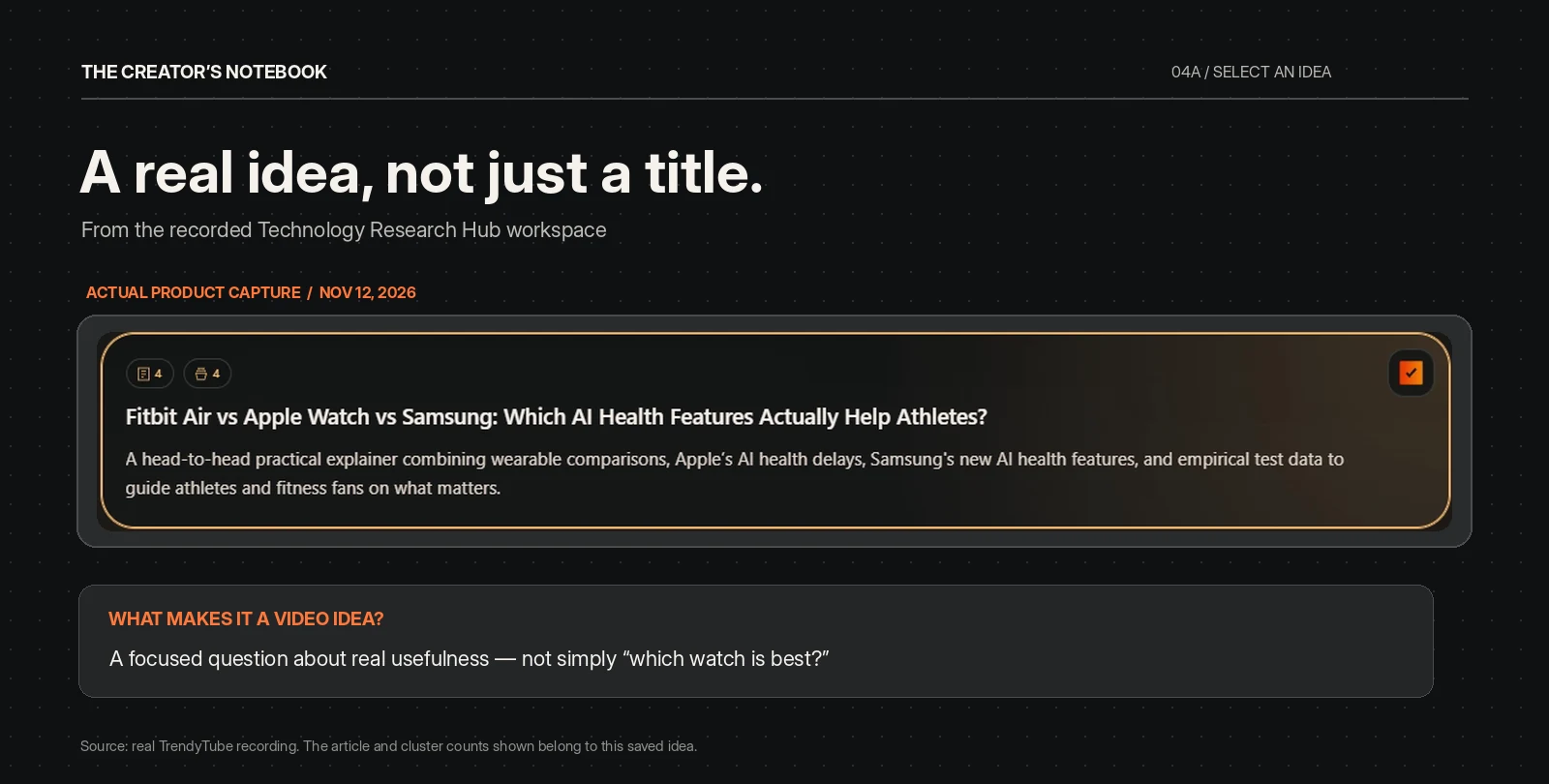
From there, we selected the idea and requested a script.
But Will the Script Actually Sound Like You?
A YouTube script generator can give you a draft. But if you've ever asked AI to write one, you probably know the problem.
Sometimes the information is fine, but the writing just doesn't sound like something you'd say. Maybe it begins with a dramatic introduction you'd never use, or sounds stiff when your videos are usually relaxed.
Every creator has their own way of talking. Some get straight to the point. Others build a story first. Some use humor, quick explanations or little reactions that make their videos feel personal.
When previous video transcripts are available, TrendyTube can use patterns in a reference channel's wording, tone, pacing and structure to help guide a new script draft.
The goal isn't a perfect copy of someone's personality. It's a starting point that takes the channel's existing style into account, instead of treating every creator the same.

In our wearable-tech example, the generated script had a structured outline, sections comparing the devices, timing guidance and linked research sources.
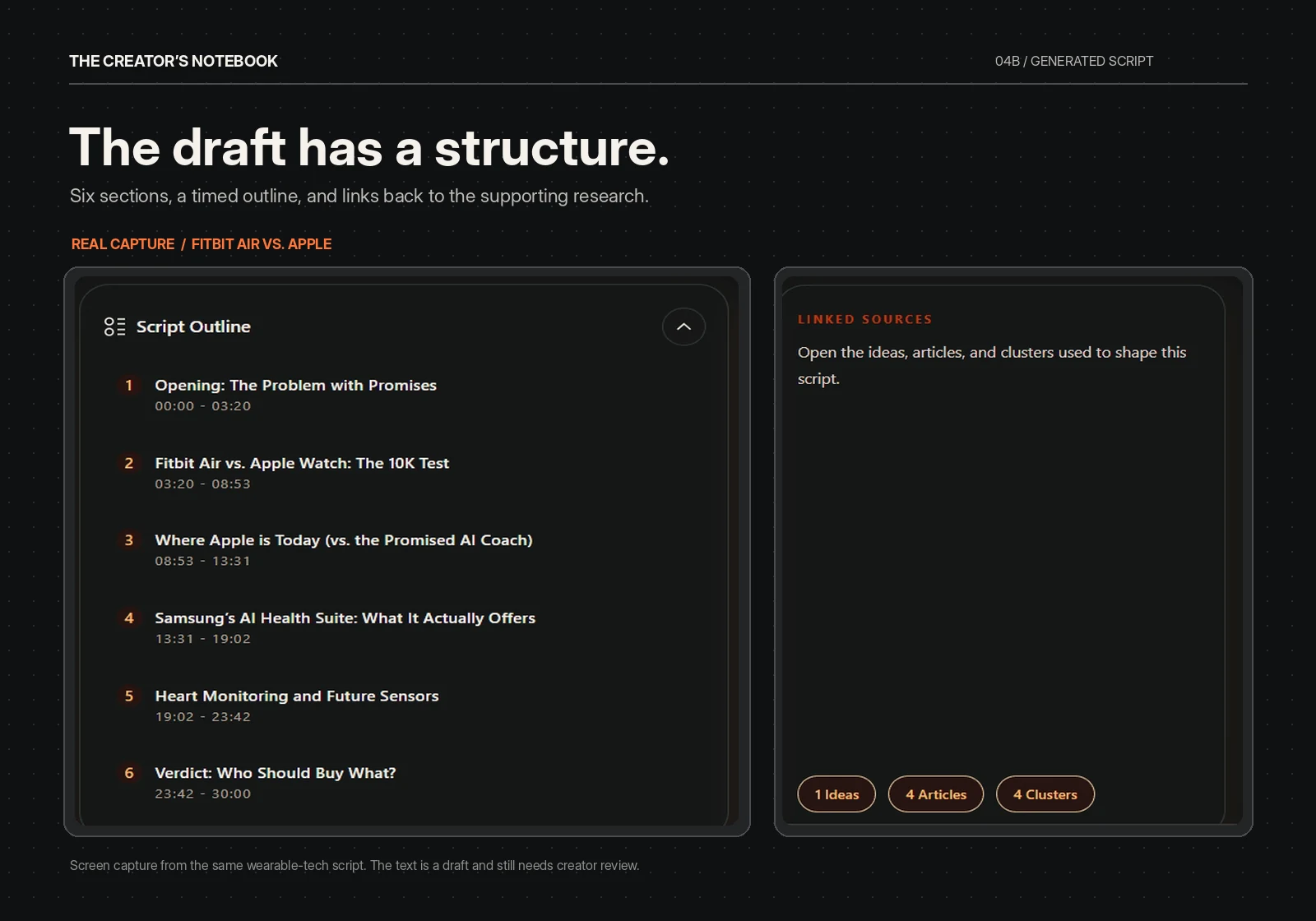
Now, does that mean the script captures your personality perfectly? No. And you probably wouldn't want to publish a first draft without touching it anyway.
You still need to check the facts, change anything you wouldn't naturally say and add your own opinions or experience. If a draft claims you tested a product when you haven't, that's something to fix before recording.
Worth remembering: the research helps you decide what to talk about. The draft gives you a structure. You're still the one who makes the video yours.
But there's a big difference between staring at a blank page and starting with a researched draft that already has a direction.
So, What Happens When It's Time for Your Next Video?
Let's say you spend Monday planning videos, Tuesday filming and the rest of the week editing.
Wouldn't it be nice if, by the time Monday comes around again, you already had some interesting stories and video ideas to look through?
That's where scheduling your research can come in handy.
You can set it up around your routine. Maybe once a week works for your channel, or maybe you need more frequent updates.

Then, whenever you're ready to plan another video, you can see what the research has found, explore a few ideas and choose something worth making.
Of course, not every suggestion will be worth a video. Some stories won't fit your audience. Others will need more research or a different angle.
And that's fine.
The agent is there to help with the searching and organizing—not to make every creative decision for you. You still decide what to create, what to say and how to tell the story.
Some weeks you'll find a story you're excited to cover. Other weeks, you might look through a bunch of ideas and decide none of them are quite right.
And that's okay.
It's still your channel, your judgment and your way of telling the story. Having a little help with research just means you don't have to collect everything from scratch each time.
A Few Questions You Might Have
Just the practical stuff, before you try it for yourself.
How do I find YouTube video ideas for my niche?
Start with what your audience already cares about. Look for relevant news, questions, comparisons and problems you could explain. Then ask what you can add. A useful angle often matters more than picking the biggest trending story.
Can a YouTube AI agent find video ideas automatically?
Some tools can regularly discover articles, group related stories and suggest ideas based on a channel's niche. TrendyTube's Research Hub can do that on a schedule you set, within your plan's limits. You still review the results and choose what to make.
Can AI help write a script in my style?
It can help create a starting draft. When previous transcripts are available, Research Hub can use patterns in the reference channel's tone, phrasing and structure. You'll still want to edit the script and verify its facts.
How often should I research new video ideas?
It depends on your channel. Weekly may work for tutorials or evergreen topics; news channels may want more frequent updates. TrendyTube's scheduling options and refresh limits depend on the plan—check current plan details.
About the examples
The Google Pixel, Ukraine–Russia and Oura angles are editorial illustrations based on reporting from November 10–11, 2026. They were not generated by TrendyTube. The wearable-tech idea and script screenshots come from real Research Hub recordings. Feature availability depends on the plan and configuration.
Original sources: Google Pixel Drop · Oura announcement · Reuters reporting